
Refunds and Payouts
This guide will explain how refunds and payouts work for your store.
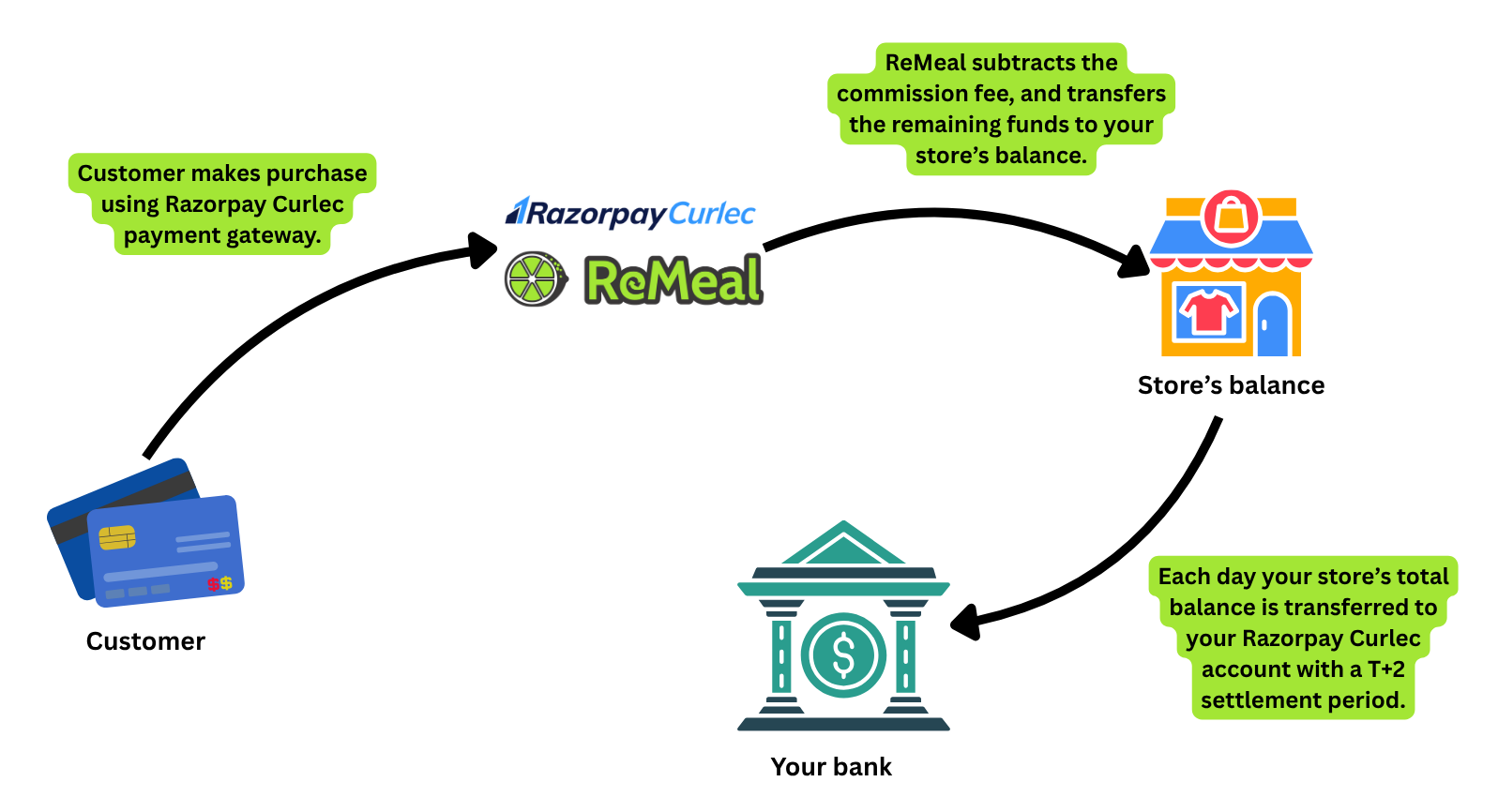
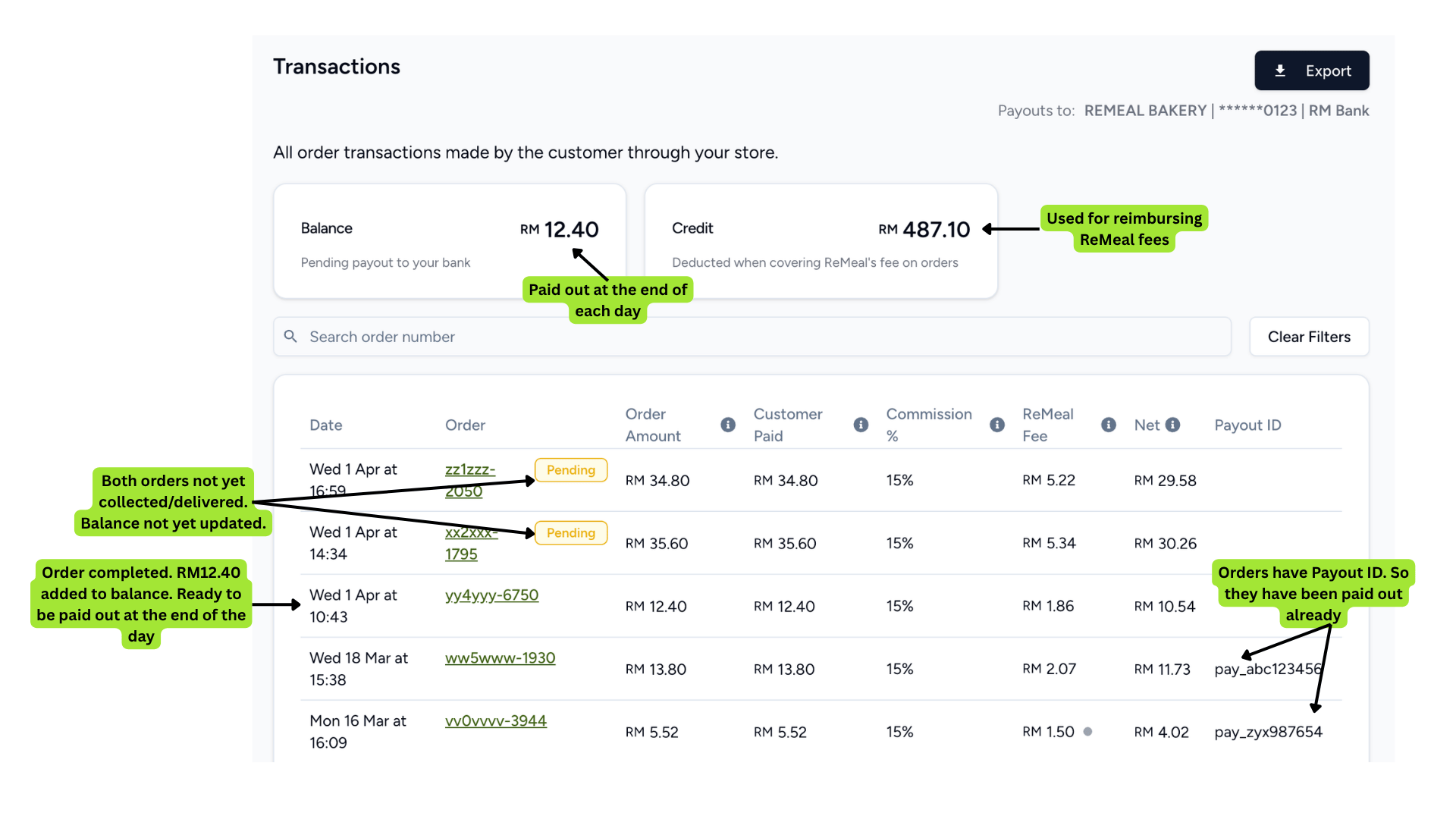
When an order has been collected or delivered, the amount you receive (order amount minus ReMeal fee) is added to your store's balance. The balance is the amount that is pending transfer to your Razorpay Curlec account, which is then paid out to your bank account.
The net amount you receive from each order is shown on the Transactions page as well as on each order's individual page if you have Admin access. Staff employees will not see this detail.
Your balance is updated throughout the day when orders are marked as completed. At midnight, the total balance is transferred to your Razorpay Curlec account, and then appears on the Payouts page.
If you have multiple stores linked to the same bank account, this also means they share the same Razorpay Curlec account. The payout amount will include pending balances from all stores for that day, and will be paid to your bank account in a single transaction. On the Payouts page you will be able to see the breakdown of the amount from each store.
Note: The balance is only updated when the order is completed, ie when the customer has received the order via pickup or delivery. This means that for dine-in orders with advanced reservations, the amount will only be transferred after the dine-in has occurred.
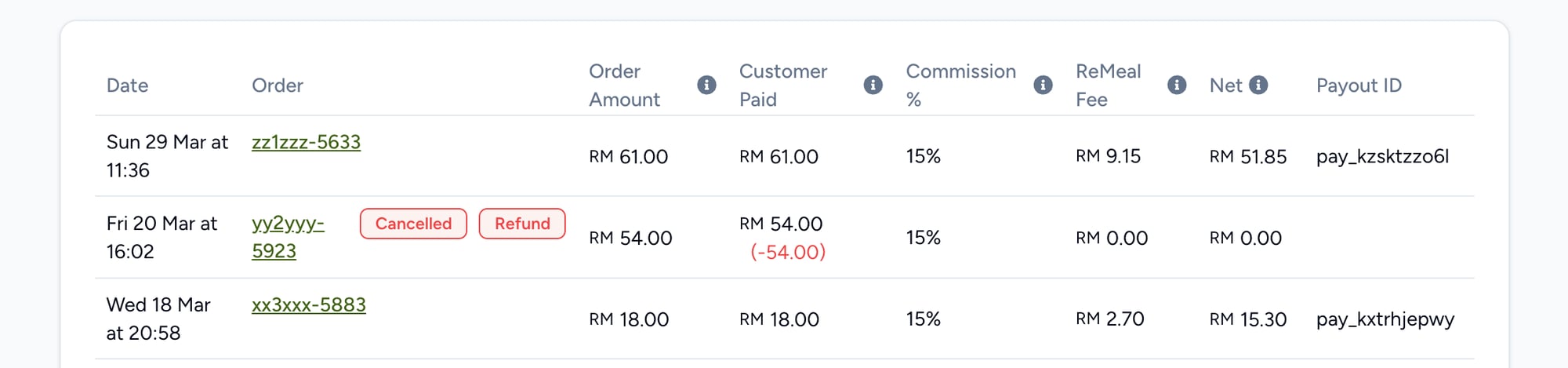
You can either provide the customer a full refund (order cancellation), or a partial refund (when part of the order can't be fulfilled). When a refund occurs, the ReMeal fee is recalculated on the new order amount. This ensures you are not overcharged on items that were not fulfilled.
The behaviour of payments for refunds differs depending on when it occurs.
1. Before the order has been marked as completed
This is the most common scenario. For full refunds or cancellations, the order was never marked as completed, so the order amount was never applied to your store's balance. It is as if the order never occurred.
For partial refunds, the ReMeal fee is recalculated when the partial refund has occurred. The balance will be updated with the new recalculated amount once the order is completed. The updated amount will always be shown on the Transactions page and the order's individual page.
2. After the order has been marked as completed
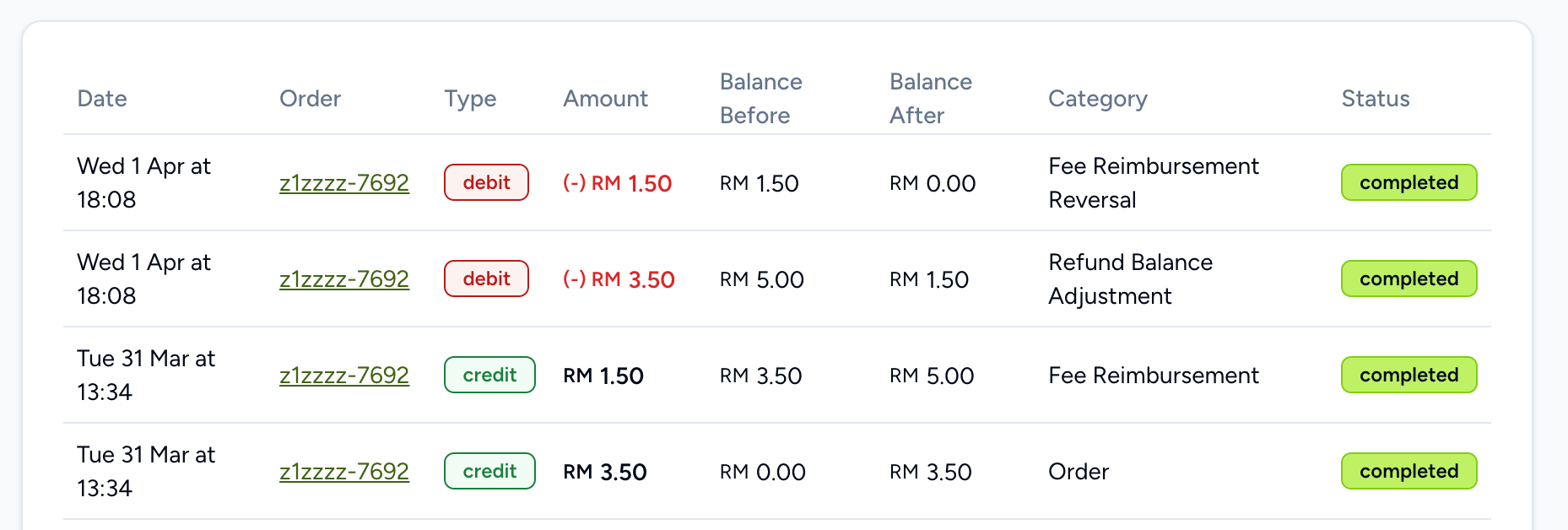
This can happen if, for example, an item was mistakenly left out of the customer's order. As the balance has already been updated previously, the balance will need to be adjusted to accommodate the new amount. The difference is deducted from the balance and will show on the Balance page as a Refund Balance Adjustment.
If the amount for that order has already been paid out previously, this could result in your store receiving a negative balance. This means that you will need to ensure future orders can bring your balance back to positive to continue receiving payouts.
Note: Currently only the ReMeal team can process refunds on your behalf after an order has been completed.
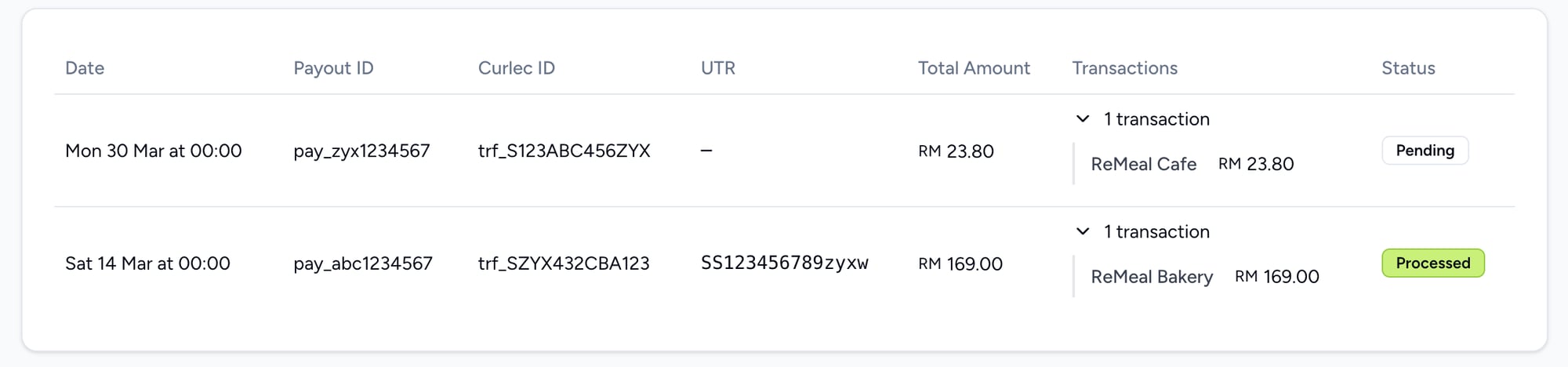
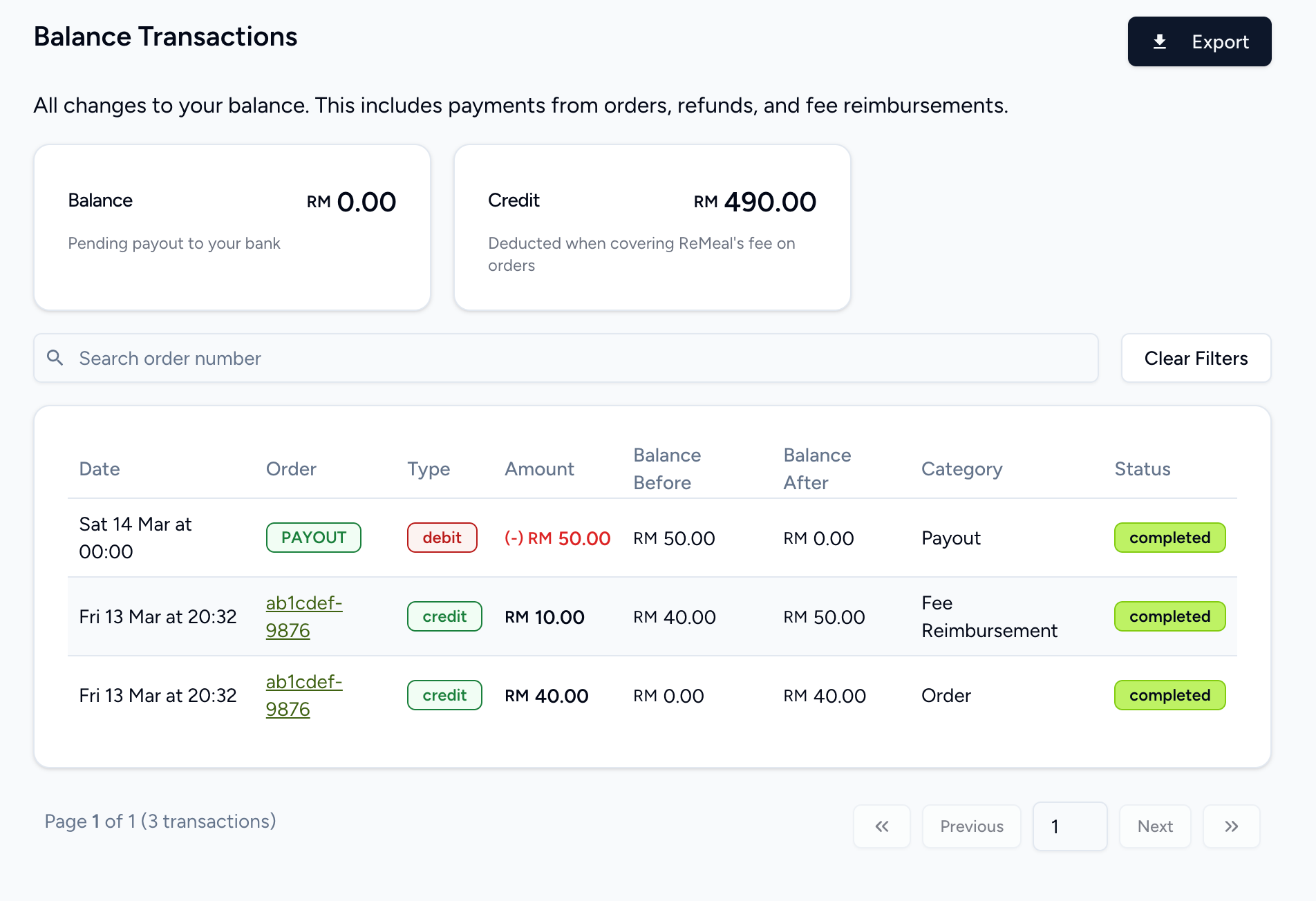
At midnight each day, your store's balance is transferred to your Razorpay Curlec account. This will then be processed for payout to your bank account. When it has been transferred, the amount will be shown on the Payouts page. Your balance will then be reset to zero. This transaction is shown on the Balance page with type debit under the category Payout.
If you have multiple stores linked to the same bank account, this also means they share the same Razorpay Curlec account. The balances from all these stores will be accumulated and paid to your bank account as a single transaction.
Each payout is listed in the Payouts page where you can also see the breakdown of each transaction when the payout consists of multiple stores.
The settlement period is T+2 working days, excluding weekends and public holidays. This means you can expect the amount to be settled in your bank account 2 working days after the transfer has been made.
The UTR number is used to reconcile payouts with your bank statements. Payouts will appear on your bank statement as RAZORPAY CURLEC with the UTR number.
ReMeal can apply store credit to your store. This is an amount that is deducted when covering ReMeal's fee on orders. This works on a fee reimbursement basis after an order has been completed. For example, if an order has a RM2 fee, this will initially be charged. Providing that you have at least RM2 store credit, this will immediately be reimbursed, and your balance will be credited RM2. This is shown on the Balance page as a credit under category Fee Reimbursement. If you have less than RM2 store credit, the whole credit will be used and you will receive a partial reimbursement.
You can grant your employees access to only finance related data by assigning them the Finance role on the Employees page. This will give them access to all the Payments pages, as well as the ability to export each report in Excel or CSV format.
ReMeal creates your Razorpay Curlec account and fully manages it, so you do not need to access it. All payment data is visible in ReMeal's Seller Portal. However, if you would like access to your Razorpay Curlec account's dashboard, you can do this by getting in touch with us and providing an email address to be used as the login. Once activated, you will then receive an email with instructions on how to access your dashboard.